
Why does the thank-you page matter?
The page a supporter sees right after buying you a coffee — the Thank You Page — is not just a simple payment confirmation. It is the moment when someone has just done something good for you and is open to a positive experience. They are more likely to remember it, come back, and recommend you to others. It is worth making the most of this moment instead of treating the page as a formality.
How does buycoffee.to solve the problem of community expectations toward Creators?
On many subscription platforms, the rule is “something for something”: someone pays, and in return, you have to provide exclusive content — a private group, bonus episodes, or a moderated Discord. In addition to creating pressure to stay constantly productive, all of this starts to resemble a sale, which makes the support feel less like a voluntary donation. Over time, every new support tier means more work for you and less time for what you actually want to do.
Comparison: traditional subscription vs. recurring support on buycoffee.to
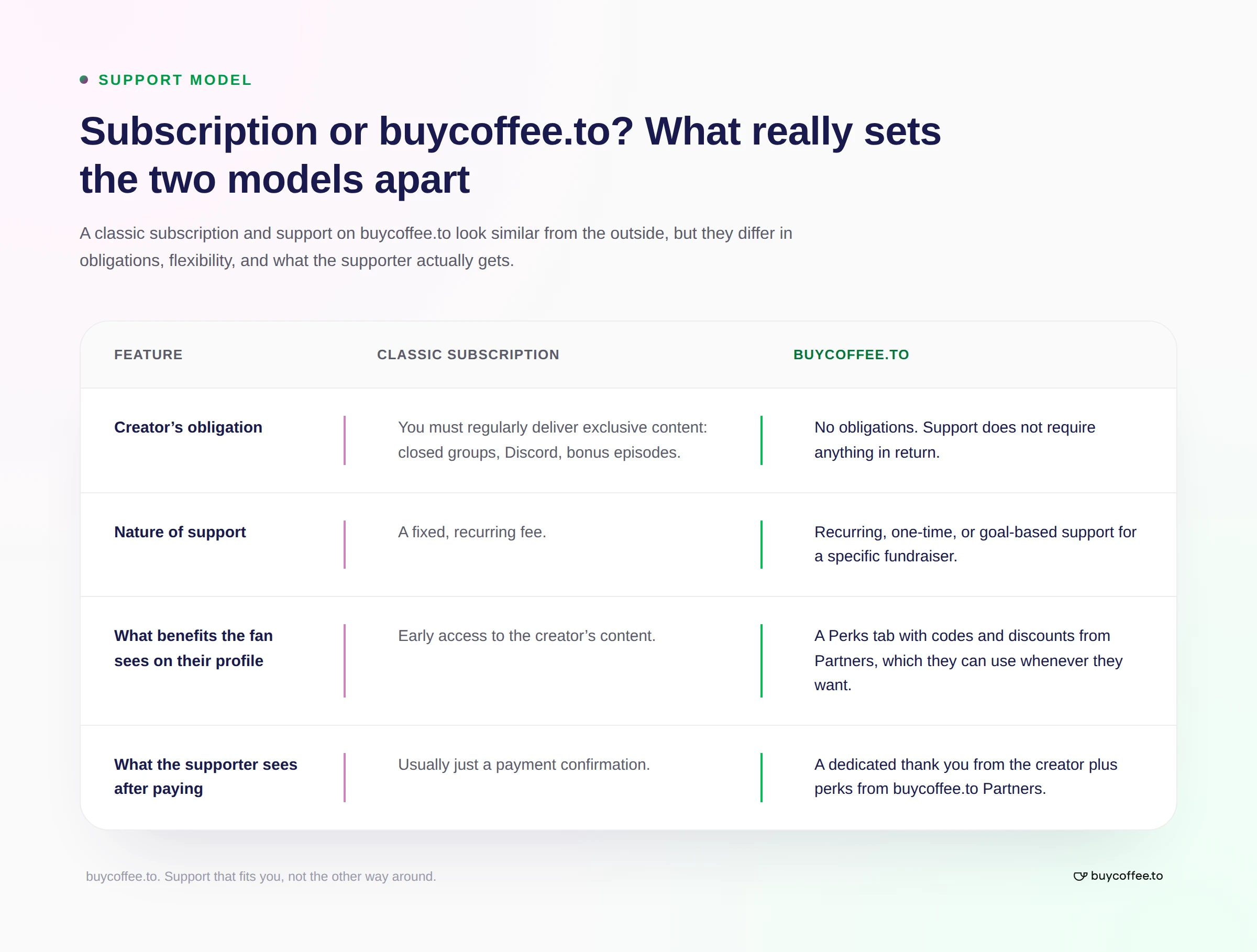
What do Creator–Supporter relationships look like on buycoffee.to?
On buycoffee.to, receiving a coffee does not require you to give anything in return. buycoffee.to takes care of the cost and logistics of thanking the supporter. Our partners include Bookbeat, Legimi, Portal Yogi, and Jack SEO, among others. We are continuously expanding our partner offering, with more companies planned that provide solutions designed directly for Creators and Supporters.
Here is what happens step by step, right after someone buys you a coffee:
Payment. The supporter pays using one of the fast payment methods available on the platform, such as BLIK.
Redirect. The system automatically takes them to the Thank You Page, adapted to the device they are using.
Gift selection. The supporter sees discount codes from the platform’s partners.
Reward collection. The codes appear directly on the screen and are also sent to the supporter by email. If the supporter has an account on buycoffee.to, they can use them at any time by going to the Gifts tab in their dashboard.
In addition to a partner discount code, the Creator can also add their own dedicated thank-you message, such as a short note with a link to a file — an e-book, bonus material, or a presentation. This is your own extra addition and is completely optional. The discount code works independently of whether you choose to use this option.
The “Gifts” tab in the Creator Dashboard
The codes that appear on the Thank You Page are also available in your Creator Dashboard, in the “Gifts” tab. There, you will also find special offers available only to Creators. You can use them independently — outside the platform, on social media, or in your newsletter — as free rewards for your community.
Go to Dashboard → Gifts tab → codes to use on social media
Is it worth giving away discount codes from other brands?
That is a valid concern. The answer is simple: when someone receives a discount code from you, they associate that positive feeling with you, not with the brand offering the discount. You are the person who gave them something. Your own products — courses, e-books, or services — do not lose value because of this. Instead, you gain a more engaged community that is more likely to support you again in the future.
A few ways to use codes from the Gifts tab
Reward for a quick response under a post or during a live stream. After publishing an important piece of content, offer a reward to the first few people who leave a meaningful comment related to the topic.
Example: “For the first 5 people who leave a thoughtful comment under this post, I have a discount code from my buycoffee.to dashboard — this time for access to audiobooks from Bookbeat.”
Reward in a newsletter. Hide a question somewhere in the email. People who answer it receive a discount code — the same one that normally goes to supporters on the Thank You Page.
Recognition for the most active person of the month. Once a month, choose the person who was most active in the comments and publicly reward them with a code from your Dashboard.
Welcome gift for new followers or subscribers. Someone who has just started following you or signed up for your newsletter is at the beginning of their relationship with you — much like a supporter right after making a donation. You can use this moment: send them a welcome message with a link to a code from your Dashboard as a “thanks for being here” gesture.
Reward for completing a survey or giving feedback. If you are collecting opinions about your content — for example, through a survey about topics for future materials — you can offer a discount code as a thank-you for the time spent filling out the form. It is a real incentive that can increase the number of responses.
Quiz element. Instead of giving away a code for a specific task, you can turn it into a prize in a quiz about your content. The winner receives a code from the Gifts tab.
Thank-you for recommending you to others. If someone tags you in a post, recommends your channel to friends, or leaves a review, you can thank them with a discount code. It is a cheaper and simpler way to appreciate the ambassadors of your work than any referral program you would have to build yourself.
Reactivating inactive audience members. You can send a message with a discount code to people who have not interacted with you for a while — for example, those who have not opened your recent emails — as a reason to reconnect: “I missed you, come back — I have something for you.”
What benefits do partner gifts on the Thank You Page provide?
Benefits for you as a Creator
You do not need to create anything extra. The gift appears automatically, without your involvement and without any additional work on exclusive content.
You do not cover the cost. The discount is funded by the partner or the platform, not by you.
The supporter associates the positive feeling with you, even though you are not the one funding the reward.
You get an additional tool for building relationships — you can use the same codes outside the platform, for example on social media, in your newsletter, or in contests.
You increase the chance that the supporter will come back — a positive experience right after making a donation increases the likelihood of future support.
Benefits for the Supporter
They feel seen and appreciated.
It strengthens the feeling that supporting you is worthwhile, which increases the chance that they will support you again.
Summary
To get started: go to Creator Dashboard → Gifts tab → choose one code and test it with your community.
Frequently Asked Questions
Do I need to do anything for the supporter to receive a gift on the Thank You Page?
No. The gift appears automatically after someone buys you a coffee — you do not need to configure or deliver anything.
Where do the discount codes in the Gifts tab come from?
They are codes from buycoffee.to partners — companies and brands the platform works with. The cost of the discount is covered by the partner or buycoffee.to, not by you.
Does giving away codes from other brands hurt my personal brand?
No. The person receiving the code associates the positive feeling with the person who shared it — you — not with the partner brand.
Can I use codes from the Dashboard outside buycoffee.to?
Yes. You can freely use the codes from the Gifts tab on social media, in your newsletter, or during live streams.
How is buycoffee.to different from traditional patronage platforms, such as Patronite or Patreon?
On buycoffee.to, buying a coffee does not create an obligation to provide exclusive content in return — the supporter receives a gift from the platform, not from you.
Can the supporter lose the discount code?
No. The code is sent to them by email immediately after the donation. If they have a buycoffee.to account, they can also find it in the dedicated gifts section of their account.